 Tiny Print App Docs
Portable Mini Printer
User manual for the Portable Mini Printer and the Tiny Print app.
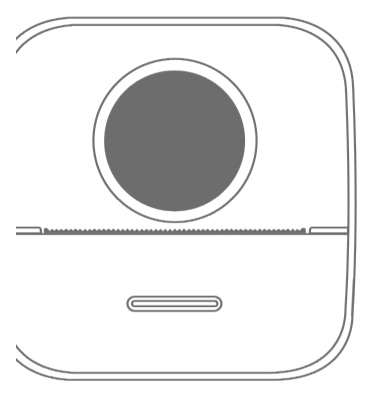
Thank you for using the intelligent digital products produced by our company. We have included detailed instructions from which you can learn how to use the products. Please read the instructions carefully before you start using this machine, so that you can use the product correctly. Please note that the contents may be changed without prior notice. This product is a uniquely shaped, exquisitely designed and easy-to-operate portable mini printer, designed for children's digital products, so that children can learn through imaginative play and experience the fun of nature.
Maintenance & Care
This product should not be placed in a wet environment for a long time; please wipe surface stains with a dry cloth. Wires, plug shells and other components must be checked regularly for damage, and if damaged, use should be stopped immediately until repaired, in order to reduce battery aging and swelling. If it is not used for a long time, it needs to be charged approximately once every three months.
Key & Interface Specification
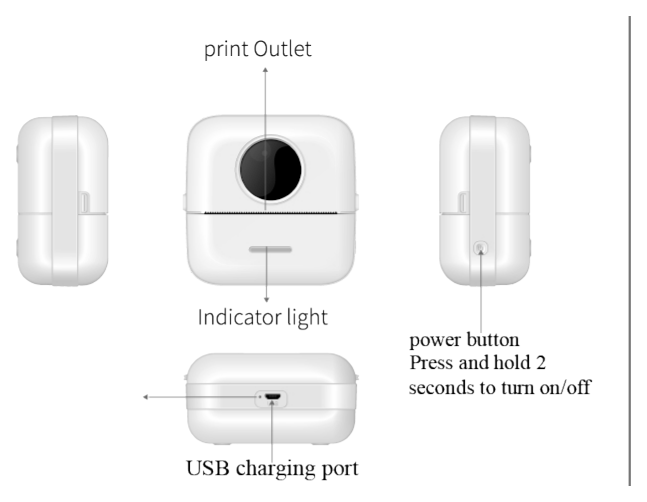
Indicator Status
| Indicator | Meaning |
|---|---|
| Green light flashing | Normal use status |
| Red light on | Out of paper / overheat / cover opened |
| Red & green light flashing | Low power |
Product Specifications
| Specification | Detail |
|---|---|
| Product size | 82 × 82 × 45 mm |
| Battery capacity | 1200 mAh |
| Printing method | Inkless (thermal) printing |
| Display method | Black and white |
| Printing sharpness | 200 dpi |
| Paper size | 57 × 26 mm × 6 m |
| Bluetooth | 2.1 / 4.2 |
| Input power | DC5V / 2A |
| iOS and Android app | Tiny Print |
Device Set-up
For first use, charge the device first. Press and hold the power button for 3 seconds to power on.
Install the Tiny Print app. Search for "Tiny Print" in the Apple App Store or on Google Play and install the app to use it.

Connect the printer. After Bluetooth is enabled, open the app you downloaded on your phone and connect to the Bluetooth printer from the My device tab. Once the connection is successful, you can print.
Paper Replacement
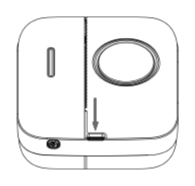
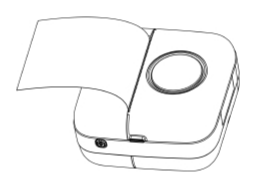
Press both sides inward in the direction indicated by arrow 1, while opening the paper bin cover lid upward as shown by arrow 2.
Take out the old paper roll and put the new paper roll in the direction shown. The paper should be placed straight and not crooked.
The new thermosensitive paper needs to protrude about 2 cm from the paper bin, so that the machine can feed the paper automatically when the paper bin is closed.
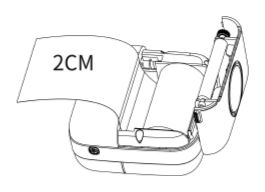
Close the paper bin; the machine will automatically feed the paper for normal use. After the above steps are completed correctly, the machine can print normally.
Battery Warning
- Please use a 5V charger as specified to avoid damaging the machine.
- Disassembly, impact, extrusion or exposure to fire are prohibited.
- If severe bulging occurs, do not continue to use it.
- Do not place it in a high-temperature environment; using the battery after immersion in water is prohibited.
- Replacing with the wrong type of battery can be explosive. Always follow the instructions for disposing of used batteries.
Important Notes
- When charging, gently insert or pull out the charging cable to prevent excessive force from damaging the port.
- After charging, unplug the charging cable promptly.
- To avoid danger, do not use or charge the product in high-temperature, high-humidity, excessively smoky or dusty environments, such as bathrooms, steam rooms, or near open flames.
- Improper charging may damage the print head.
- Avoid touching the print head to prevent overheating and burns.
- The paper-tearing blade is sharp; be careful not to touch it.
- This product contains small parts and is not suitable for children under three years of age.
- A guardian should supervise children while they use it.